

To update these options for another staff member, a user must already have Administrative rights.
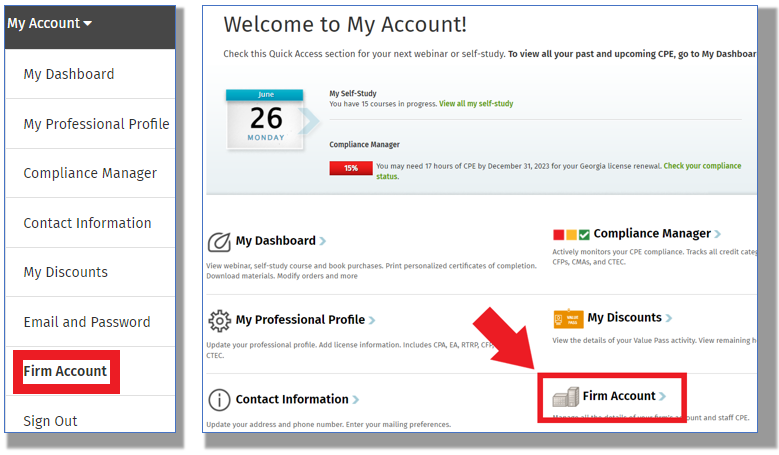
Navigate to the My Account > Firm Account > Firm Staff Members area either through the menu on the top right or in the My Account area:
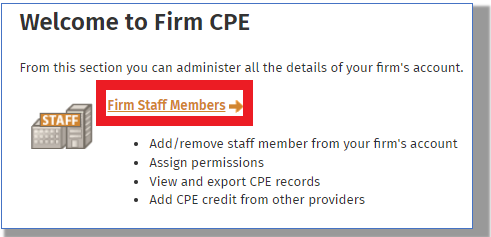
Select the Firm Staff Members option:
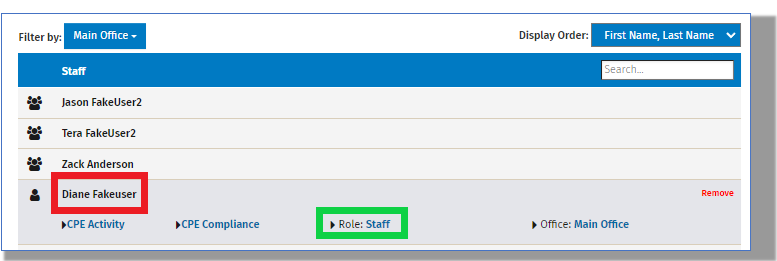
Click on a staff member's name to highlight is and then on the "Role" option:
Select the desired role and click on "Submit":
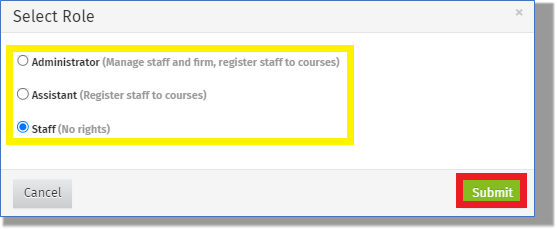
Please note the User Role functions:
Staff
Login and register themselves for any content they have permission to
Access any content they are registered for including Self-Study and Webinars
Access their personal transcripts in the "My Dashboard" area
Create extra transcript items for their personal tracking
Update their "My Personal Profile" information including license information
Update their individual password or email
Assistant
Login and register themselves for any content they have permission to
Access any content they are registered for including Self-Study and Webinars
Access their personal transcripts in the "My Dashboard" area
Create extra transcript items for their personal tracking
Update their "My Personal Profile" information including license information
Update their individual password or email
Register other staff members to content (Self-study or webinars)
Administrator
Login and register themselves for any content they have permission to
Access any content they are registered for including Self-Study and Webinars
Access their personal transcripts in the "My Dashboard" area
Create extra transcript items for their personal tracking
Register other staff members to content
Update their "My Personal Profile" information including license information
Update their individual password or email
Create/Remove staff members in the Firm Account > Firm Staff Member area
Viewing staff members' transcripts
Update a staff members role
Administrate Compliance Manager for themselves and for their staff including:
Updating a staff member's license information
Running any completed CPE reports for a staff member or members
Create extra transcript items for their staff
Create and Assign "Learning Ladders" to their staff
Manage any firm subscription information for their staff including:
Allocating premium/self-study bulk hours to a staff member
Assigning open firm passes to staff
Please note a Firm can only have 1 Delegated Admin - this would be the individual subscriptions would be tied to. Otherwise, as many admins as required is possible and all will have the same permissions/rights.
